Making secure deliveries efficient with one-time password updates
At Amazon Flex, we're always looking for ways to make your experience delivering packages to Amazon customers easier. That's why we're excited to launch a new feature which allows you to resend one-time passwords to customers directly from the Amazon Flex app. This enhancement is designed to help you complete one-time password deliveries on the first attempt.
How one-time password deliveries work
One-time password deliveries require Amazon customers to provide delivery partners a password upon delivery. The one-time password is emailed directly to the Amazon customer on the day of delivery and made available in the “Your Orders” section of the Amazon app.
If your route includes a one-time password delivery, upon arrival, the Amazon Flex app will notify you and prompt you to ask the customer for the password. You have three attempts to enter the password to complete the delivery.
Resending one-time password to Amazon customers
Based on your feedback that the customer is often unable to locate the password, you now have the option to resend the one-time password to the customer while at the delivery address. You can do this directly from the Amazon Flex app by tapping “Resend the password to the customer” when on the “Verify one-time password” window. The customer will then receive a text message, email, and in-app notification with their existing one-time password. You can resend the one-time password three times per package.
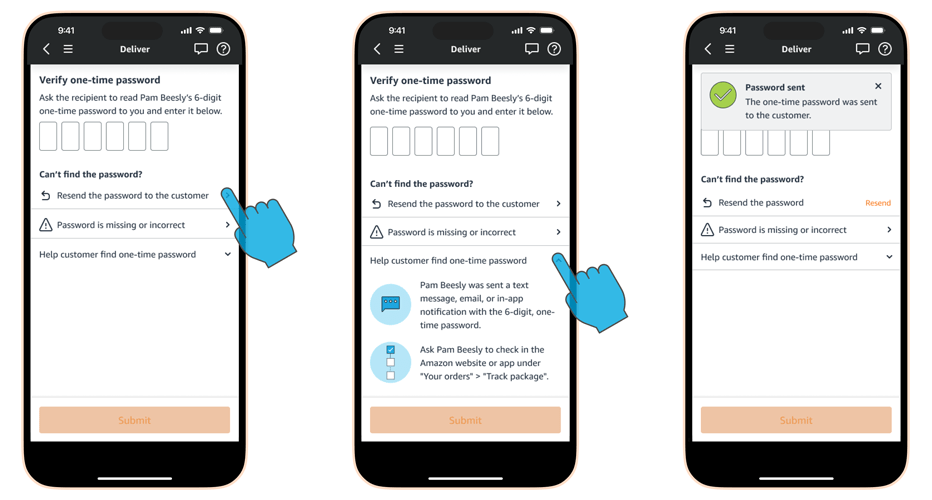
If a customer isn't physically present to accept the delivery, or you do not receive the correct one-time password, mark the package as "Unable to Deliver" in the Amazon Flex app, and return it to the delivery station at the end of your block. Never accept passwords over the phone or via messages.
This improvement is part of our ongoing commitment to improve your experience with Amazon Flex. If you have any questions about one-time password deliveries, visit the “Making deliveries” section of the Learning Portal, or contact Driver Support in the Amazon Flex app.
Related Blog Posts

Amazon Now offers delivery partners more flexible ways to earn
Learn from delivery partners about how they deliver a high-quality customer experience
Keeping you safe during severe weather
Meet a delivery partner who saved a home from a fire while delivering

Thank My Driver is back!

Amazon Flex Store offers items to help keep you safe when delivering
Download the Amazon Flex app
Create an account to set your schedule, see your earnings upfront, and start delivering with confidence.