Location-based information and support at your fingertips
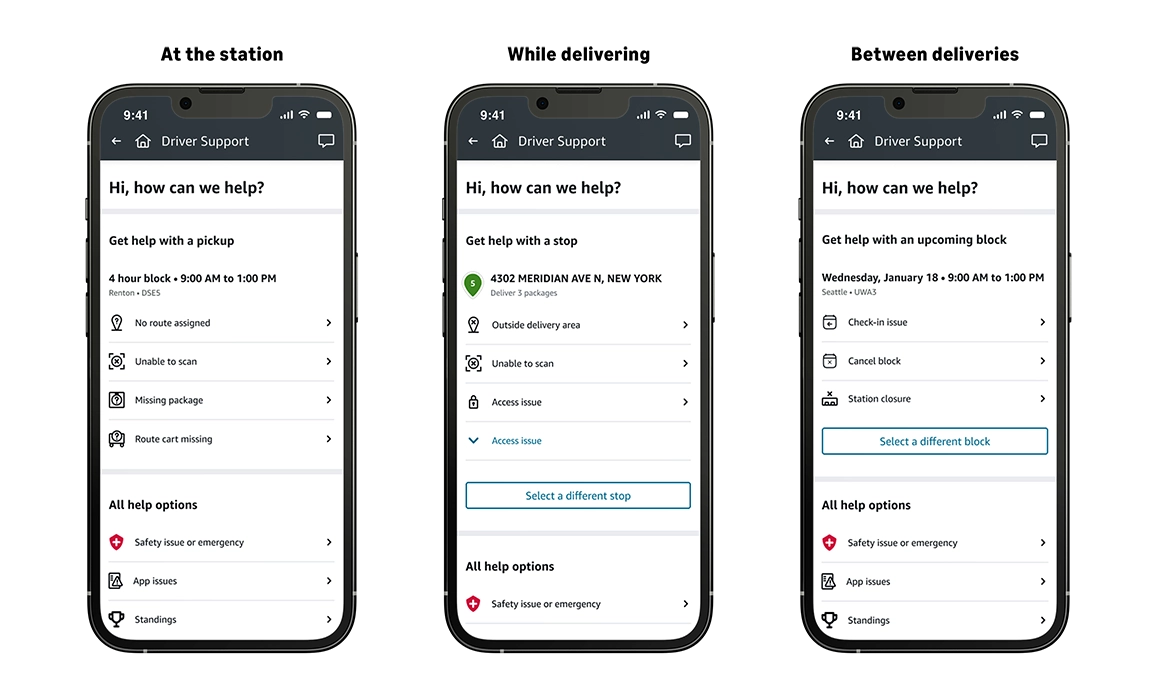
We know that having quick access to the right information makes all the difference in delivering a great experience for Amazon Flex delivery partners. That is why we have updated the Amazon Flex app's support page. Now, you can find tailored information depending on your location—whether you are at the station, while delivering, or between deliveries —making it faster and easier to find the solutions you need.
You can access the new support page in the Amazon Flex app by navigating to the main menu and clicking Help or the question mark (?) icon displayed in the top-right corner. There, you will see self-serve information based on your location, as well as one-click options to connect you to Driver Support via phone or chat.
If you are located at a station, you will receive quick access to relevant support information for the most common questions, such as route assignments, route carts, and scanning packages. While delivering, the page provides quick solutions to questions about delivery areas, accessing a customer location, and package drop-off. Finally, if you have questions when you between deliveries, you can quickly find information about canceling a block, station closures, and more.
Other support options
We offer live chat through the Amazon Flex app in addition to phone support, email support, and on-demand resources such as the in-app Learning Portal. Visit the main menu and click Help > Contact Us or the question mark (?) icon displayed in the top-right corner. These support options allow you to get the assistance you need in the quickest and most convenient way that suits your personal preferences.
We value your feedback and will continue to make improvements to the Amazon Flex app that ensure you receive the support you need, when you need it.
Related Blog Posts
Delivery partners save more on fuel from March 16 to April 15, 2026

Amazon Now offers delivery partners more flexible ways to earn
Learn from delivery partners about how they deliver a high-quality customer experience
Keeping you safe during severe weather
Meet a delivery partner who saved a home from a fire while delivering

Thank My Driver is back!
Download the Amazon Flex app
Create an account to set your schedule, see your earnings upfront, and start delivering with confidence.