

Location-based information and support at your fingertips

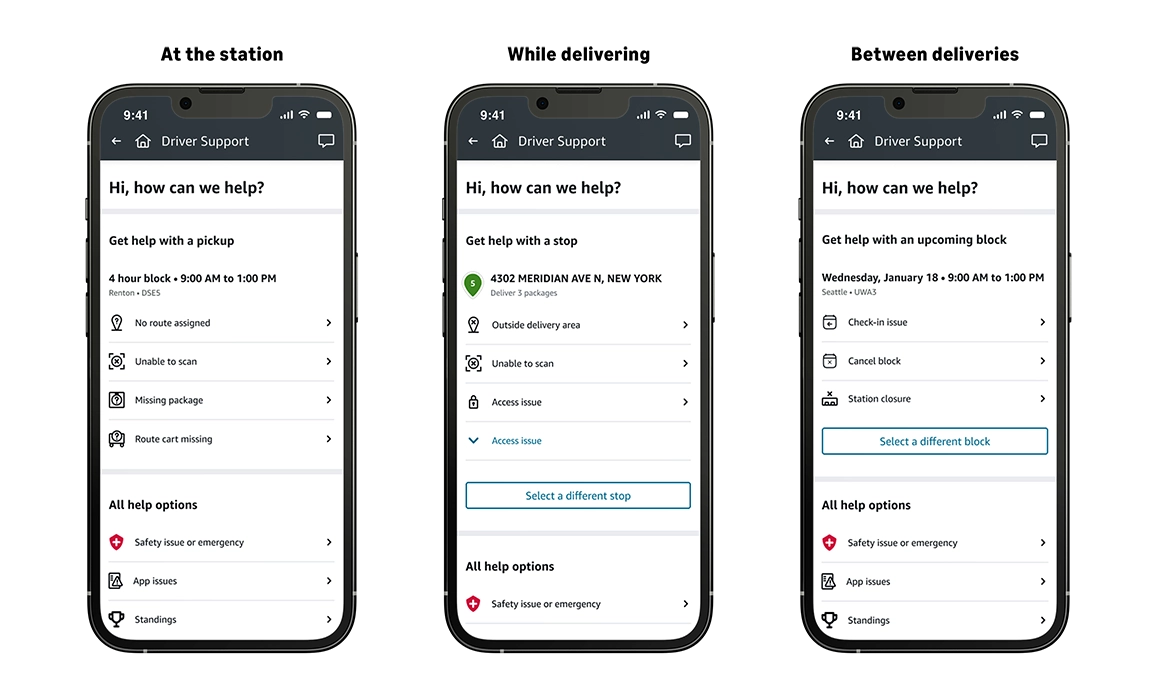
We know that having quick access to the right information makes all the difference in delivering a great experience for Amazon Flex delivery partners. That is why we have updated the Amazon Flex app's support page. Now, you can find tailored information depending on your location—whether you are at the station, while delivering, or between deliveries —making it faster and easier to find the solutions you need.
You can access the new support page in the Amazon Flex app by navigating to the main menu and clicking Help or the question mark (?) icon displayed in the top-right corner. There, you will see self-serve information based on your location, as well as one-click options to connect you to Driver Support via phone or chat.
If you are located at a station, you will receive quick access to relevant support information for the most common questions, such as route assignments, route carts, and scanning packages. While delivering, the page provides quick solutions to questions about delivery areas, accessing a customer location, and package drop-off. Finally, if you have questions when you are between deliveries, you can quickly find information about canceling a block, station closures, and more.
Other support options
We offer live chat through the Amazon Flex app in addition to phone support, and on-demand resources such as the in-app Learning Portal. For faster access to Driver Support, please use live chat. Open the Main Menu >Help > Contact Us > Chat. Chat is available in both English and Spanish. Chat provides real-time support to resolve your questions faster. You can get immediate answers to common questions and access self-serve tools right in the app. If you need personalized help, chat can connect you directly with a live Driver Support associate who has your account details ready. For safety and legal matters, email support remains available through flex-representative-support@amazon.com.
We value your feedback and will continue to make improvements to the Amazon Flex app that ensure you receive the support you need, when you need it.
Related Blog Posts

Your guide to Amazon Flex payment options

Save on fuel, dining, childcare, and more with Amazon Flex Rewards

Making the delivery station check-in process more efficient
Meet a delivery partner earning on her own schedule this school year

Celebrating Driver Appreciation Week

Navigating building entrances with ease
Download the Amazon Flex app
Create an account to set your schedule, see your earnings upfront, and start delivering with confidence.