Find answers here
.webp)
What is required to deliver with Amazon Flex?
To become an Amazon Flex Delivery Partner, you must meet certain eligibility criteria and complete the necessary onboarding steps. Here's what you need to ensure you qualify:
- Age Requirement: You must be 21 years old or older.
- Vehicle Specification: You should have access to a 4-door, midsize sedan or a larger vehicle, such as an SUV.
- Driver's License: Possess a valid driver's license.
- Social Security Number: Have a valid Social Security Number.
- Auto Insurance: Maintain personal auto insurance that complies with your local requirements.
- Bank Account: You'll need a checking or savings account for payment processing.
By meeting these requirements, you can kickstart your Amazon Flex delivery journey in regions where spots are available. Please be aware that Amazon employees in most states are not eligible to participate in this program.
How do I sign up for Amazon Flex?
Download the app to explore if we have opportunities available near you, or join our interest list.
If you’ve joined our interest list it means we don’t have delivery spots available in your region right now. As we grow and launch new pickup locations throughout the year, additional spots in your area may open. We will notify you via email as soon as they become available.
Once delivery spots become available in your region, you’ll need to:
- Pass a background check that includes, but is not limited to, a review of motor vehicle records.
- Select a service area where you will pick up and deliver Amazon packages.
- Review our videos to learn best practices for delivering with Amazon Flex.
- Provide tax and payment details.
What kinds of deliveries will I make?
Amazon Flex offers these delivery opportunities:
- Amazon.com: Pick up packages from an Amazon delivery station and deliver directly to customers. Delivery blocks are typically 3-6 hours.
- Amazon Fresh: Pick up groceries or household items from an Amazon delivery station and deliver directly to customers. Delivery blocks are typically 2-4 hours.
What opportunities and locations are available to deliver with Amazon Flex?
We recruit for delivery partners in specific cities and towns where Amazon Flex operates and where there is high customer demand. At times, we may also look for drivers to deliver for a limited time over busy holiday seasons. You can find a list of those locations on our Locations page.
What kind of smartphone do I need?
You'll need an Android or iPhone to use the Amazon Flex app. Below are specific requirements.
Android
- An Android device using Android 14 or higher. Please note the following Android device models are not supported for use with the Amazon Flex app:
- Cat S42
- Crosscall Core-M5
- Moto G Pure
- Motorola Edge 50 Fusion
- Realme 6 Pro
- Realme Narzo 20
- Redmi Note 8
- Redmi Note 8T
- Redmi Note 8 Pro
- Redmi 9Redmi Note 9
- Galaxy A20s
- LG K41S
- Motorola Moto E22i
- Oppo A57
- Realme 6i
- Realme C15
- Realme X2 Back Cover
- Redmi A1
- Sharp AQUOS sense4 lite
- TCL 406
- Vivo Y11
- Vivo Y12
- Vivo Y16
- Xiaomi Mi A3
- BLU View 5
- Motorola Moto G05
- Motorola Moto G15
- OPPO A3x
- OPPO A3 4G
- Samsung Galaxy A03s
- Samsung Galaxy A04e
- Samsung Galaxy A04
- TECNO Spark 20C
- Vivo Y22
- Vivo Y17s
- Vivo V30 Pro
- Vivo Y37
- Xiaomi Redmi Note 11 Pro 4G
- Xiaomi POCO M5
- Xiaomi Redmi Note 12 4G
- Xiaomi Redmi Note 12S
- Xiaomi Redmi 12 5G
- Xiaomi Redmi A3x
- Xiaomi Redmi 15C 4G
- Google Play Store services enabled
- RAM Memory 3GB or higher
- At least a 5-megapixel camera
- At least a 4500mAh battery
- GPS Location Services
- SIM card
iPhone
- iPhone model compatible with iOS 17 or higher
- Operating system updated to iOS 17 or higher
What type of vehicle do I need?
In order to deliver with Amazon Flex, you'll need to use a 4-door, mid-sized sedan or larger vehicle, such as a truck with a covered bed, SUV, or a van that can safely and reliably transport assigned deliverables to customers. Smaller cars and trucks with open beds do not qualify.
Motorcycles, motorized bicycles, and motorized scooters do not qualify at this time.
What kind of insurance do I need?
As a delivery partner, you must maintain the required insurance for delivering packages in your area. In addition to your personal coverage, Amazon provides delivery partners in all states other than NY with commercial auto insurance at no cost. This policy includes:
- Auto liability coverage
- Uninsured motorist/underinsured motorist coverage
- Contingent comprehensive and collision coverage
This auto insurance policy applies only to Amazon Flex delivery partners who are actively delivering during the delivery block. In addition, if anyone other than the Amazon Flex delivery partner is driving when an accident occurs, the claim for any incurred losses will be denied. Due to local regulations, this insurance does not apply to drivers in the state of New York. If you live in New York, you may need additional commercial insurance to meet New York state law. Check with your insurance company for more information. If you are renting or borrowing a car, you will need to ensure that you have required coverage.
What are the minimum Android phone requirements?
- An Android device using Android 14 or higher. Please note the following Android device models are not supported for use with the Amazon Flex app:
- Cat S42
- Crosscall Core-M5
- Moto G Pure
- Motorola Edge 50 Fusion
- Realme 6 Pro
- Realme Narzo 20
- Redmi Note 8
- Redmi Note 8T
- Redmi Note 8 Pro
- Redmi 9Redmi Note 9
- Galaxy A20s
- LG K41S
- Motorola Moto E22i
- Oppo A57
- Realme 6i
- Realme C15
- Realme X2 Back Cover
- Redmi A1
- Sharp AQUOS sense4 lite
- TCL 406
- Vivo Y11
- Vivo Y12
- Vivo Y16
- Xiaomi Mi A3
- BLU View 5
- Motorola Moto G05
- Motorola Moto G15
- OPPO A3x
- OPPO A3 4G
- Samsung Galaxy A03s
- Samsung Galaxy A04e
- Samsung Galaxy A04
- TECNO Spark 20C
- Vivo Y22
- Vivo Y17s
- Vivo V30 Pro
- Vivo Y37
- Xiaomi Redmi Note 11 Pro 4G
- Xiaomi POCO M5
- Xiaomi Redmi Note 12 4G
- Xiaomi Redmi Note 12S
- Xiaomi Redmi 12 5G
- Xiaomi Redmi A3x
- Xiaomi Redmi 15C 4G
-
- Google Play Store services enabled
- RAM Memory 3GB or higher
- At least a 5-megapixel camera
- At least a 4500mAh battery
- GPS Location Services
- SIM card
Android devices must be compliant with Google’s security standards. Devices should also be non-rooted with Google Play Protect enabled. Find instructions on how to enable this feature.
What are the minimum iPhone requirements?
- iPhone model compatible with iOS 17 or higher
- Operating system updated to iOS 17 or higher
How do I download the app?
You can download the Amazon Flex app on your Apple or Android phone by visiting the Download App page, searching for ‘Amazon Flex’ on Google Play or the Apple App Store, or clicking on the relevant button below.
How do I re-download the app?
The Amazon Flex app can only be downloaded from a mobile phone. To download the app, search for ‘Amazon Flex’ in either the Apple App Store or on Google Play. Alternatively, visit our Download App page.
How do I install app updates?
Visit the Apple App Store or Google Play and search for “Amazon Flex" to download the latest version of the Amazon Flex app.
I don’t remember my password, how do I reset it?
You must log in to your Amazon Flex account using the same email address associated with your Amazon account.
You can reset your password by following these steps:
- Sign out of the Amazon Flex app.
- Select Sign in with Amazon
- Tap Forgot password and follow the instructions to receive assistance.
If you still cannot log into the Amazon Flex app, please contact Driver Support by calling 888-281-6906 daily between 8 AM - 9 PM PT.
Do I need to sign in to the Amazon Flex app with an Amazon account?
When you first sign up for Amazon Flex, you can use an existing Amazon account. Or you can create a new Amazon account to use with Amazon Flex.
What kind of driver's license do I need to have to be eligible to deliver with Amazon Flex?
To create an account with Amazon Flex, you must upload an image of a government-issued U.S. driver’s license that is:
- Current (not expired or invalid), without any hole punches or breaks.
- A driver’s license with your photo, not a learner’s permit, temporary license without a photo, or other unaccepted license type.
You must possess a physical, government-issued ID (not a photocopy, scan, or screenshot of a license). Your license must also match the information you provided (name, age, birth date, state, license number) in the app and show that you are at least 21 years old.
What are some tips for taking a good image of my driver's license?
When uploading your license images, please make sure the images are:
- Uploaded in order. The app will prompt you to upload the front of the license first, then the back.
- Clear and in focus. Make sure the words on the front and the barcode on the back of your license show up clearly in the photo. If you take a blurry photo, please retake it.
- Not cropped too close to the license. Use a dark background and make sure the edges are visible.
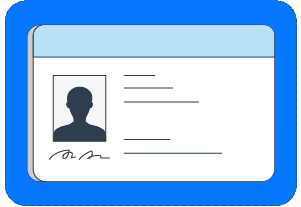
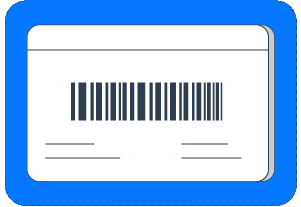
If your license photos don’t meet the requirements listed above, they will be rejected.
Can I create more than one Amazon Flex account?
No, you can only have one Amazon Flex account. If Amazon disables your account, you cannot register for another.
Why does Amazon need my photo?
Amazon uses your photos (including your photos that we already have on file), driver’s license, or government-issued ID for identification purposes. This can include making sure it's you who is doing the delivery and using your photo to identify you to customers and Amazon personnel. The photo is also used as your Amazon Flex app profile photo. We will retain your photos while you use the Amazon delivery app and as long as permitted by law or until you request that we delete your photo. You may request deletion of your photo by contacting Support, but deleting your photo will block your access to the Amazon delivery app until you replace it and your new photo is checked for validity.
How do I take a good selfie?
To ensure you can keep delivering, here are some tips for a successful selfie:
- Face the camera directly and show your entire face in the picture, this includes removing hats that cover your face and momentarily removing your mask
- Be in a well-lit area, use a neutral background, and avoid light sources behind you to ensure a clear view of your face
- Do not wear sunglasses; prescription glasses are okay, as long as there is no reflection
- A photo of a photo will not be accepted. Your photo should be taken with your phone in real time when you are prompted
If your selfie photos do not meet the requirements listed above, they will be rejected and this may impact your eligibility to deliver.
What is Amazon’s Biometric Information retention policy?
To use the Amazon delivery app, Amazon requires that users provide a photo to help us identify them. Using this photo, we may create a facial scan or similar biometric identifier, which we refer to as “Biometric Information.” This policy governs Amazon’s retention of users’ Biometric Information. Amazon may retain a user’s Biometric Information for up to 30 days after it is created for fraud detection and investigation purposes, whether or not the user continues using the Amazon delivery app during this period. After 30 days, Amazon will promptly delete the Biometric Information.
What is involved in onboarding and how long does it take?
Onboarding takes place in the Amazon Flex app. You'll be asked to provide basic information and complete other activities that can help prepare you to deliver with Amazon Flex.
Most people complete all onboarding documents in less than an hour and can start delivering with Amazon Flex in less than a week. It’s helpful to have the following items on hand when completing onboarding documents:
- Driver’s license
- Social security number
- Banking details, such as your checking and savings account numbers
- Auto insurance policy, so you can confirm that your policy meets coverage requirements
Make sure your information is correct before you submit it. You will not be able to make changes after you submit. We’ll process your information and send you an email when we’re done, or if we need any additional information. If you’re approved, you can finish your profile and start looking for offers that fit your schedule in the Amazon Flex app.
What is the interest list?
Amazon Flex welcomes new delivery partners based on the delivery needs of each area where it operates. If Amazon Flex is operating in your city but not actively recruiting, you’ll see a Join List option in the Amazon Flex app. Click Join List to let us know you're interested in becoming a delivery partner, and we’ll email you if opportunities become available. We recommend that you complete onboarding immediately after you receive an email inviting you to do so, since limited spots are available.
If you are moving and need to change your preferred delivery area, contact Support in the Amazon Flex app through Menu > Help > Contact Us.
I was approved as a delivery partner, what’s next?
The Amazon Flex app will show you offers for available blocks, which you can view and schedule from the Offers page. You can plan ahead by searching for blocks that are available later in the day or the following day. In some areas, you can mark yourself as “Available Now” in the Schedule page in the app to get notified of blocks that start within 30 minutes. With every block, you’ll know what you’ll earn before you schedule it.
How do I update my password?
You can change your password by following these steps:
- Sign in to Amazon.com.
- Click or tap Your Account > Login & security.
- Next to Password, click or tap Edit.
- Enter your current password and new password, and click or tap Save Changes.
How do I update the email address on my account?
You can update your email address by following these steps:
- Sign in to Amazon.com using the email address and password that is currently associated with your Amazon Flex account.
- Click or tap Your Account > Login & security.
- Next to Email, click or tap Edit.
- Enter your new email address and password, and then click or tap Save Changes.
How do I update the address or phone number associated with my account?
You can update your information in the Amazon Flex app on the Settings page of the app.
How do I update the driver's license associated with my account?
After you have completed the onboarding steps, you can manage your driver’s license information in the app by going to Settings > Personal Information > Driver's License > Edit and following the prompts to submit a new image of your driver's license.
Can I change my region?
You can transfer to a new region once every 7 days if your Rewards Tier status is Level 2 or higher and if there are available opportunities within the region. Region changes are not guaranteed and are dependent upon available opportunities in the desired region. To check if there are available opportunities in your desired region, navigate to Settings in the Amazon Flex app > Personal Information > Region > Request region change > Enter your preferred ZIP code > Continue.
If there is availability, you will be shown a list of available regions. The Amazon Flex app will notify you if there are no available opportunities in your desired zip code.
Once you switch regions, you will only be able to switch back to your previous region if there are available opportunities.
My account is temporarily disabled, what should I do?
Contact Driver Support at by calling 888-281-6906, or by emailing amazonflex-support@amazon.com and they will provide details about the deactivation reason and next steps for you.
What is a block?
Deliveries are organized into blocks. The Amazon Flex app will show you offers for available blocks, which you can view and schedule from the Offers page. Blocks include the date, type (such as Amazon.com or Whole Foods Market), your expected earnings, start time, and estimated duration.
What is a reserved offer?
Reserved offers are exclusively available for you for a limited time. Once a reserved offer expires, it becomes available to other delivery partners. Reserved offers are labeled as “Reserved,” on the Offers page in the Amazon Flex app.
What is Amazon Now?
Amazon Now is an Amazon Flex delivery type that provides blocks that are less than 1 hour. There are two offers types where you can either schedule up to 7 days in advance, or complete deliveries right away with an instant offer. With Amazon Now deliveries, you will deliver daily essentials locally to Amazon customers from an Amazon Now pickup location. These deliveries have shorter times and driving distances, allowing you greater flexibility and the ability to deliver locally and in areas you may be more familiar with.
What is an instant offer?
Instant offers are a great opportunity to quickly earn any time you do not have a block scheduled. They start immediately after you accept an offer. Instant offers range in length, with an average expected delivery time around an hour and a half. You’ll immediately see the route and estimated mileage, in addition to earnings information, the pickup location, start time, and estimated duration, so you can decide if it’s a good fit for you.
Instant offers are on-demand offers for blocks that start in 0 to 30 minutes. If instant offers are available in your region, you’ll see the “Online” toggle on the “Offers” screen in the Amazon Flex app. To receive notifications when instant offers are available, toggle “Online” and be located within 15 minutes from a participating location*.
To view Amazon Now instant offers, go to the Offers page of the Amazon Flex app and select “Instant offer map” and toggle “Online”. Ensure you are within 5 minutes of an Amazon Now pickup location. You will not receive offers if you wait at the station. Offers must be accepted usually within 30 seconds. Your “Online” status will also automatically turn off after the time displayed in the app and you will need to reset it to continue to receive Amazon Now instant offers.
You can read more about instant offers in the Amazon Flex blog.
*Distance to see instant offers may vary based on location and region. You will not receive instant offers while parked in the pickup station parking lot.
How do I schedule a block?
Tap Upcoming Offers on the Amazon Flex Schedule screen to view available offers throughout the day. If there's an offer that meets your needs, tap on the offer and then tap Schedule. A reservation will be added to your calendar if we confirm the offer request.
How do I find offers that fit my schedule?
Offers are added throughout the day at varying frequency, depending on the orders that customers place. To look for offers that fit your preferred location and time of day, go to the Offers page within the Amazon Flex app. Tap Filter in the upper-left corner of the screen, set your filters, and tap See results. Tap Show other offers to see all available offers, including those that do not fall within the filters you’ve set. Offer availability may fluctuate and is not guaranteed.
Once you earn Preferred Scheduling through Amazon Flex Rewards, you can set your preferred station, day of week, and time of day in the Settings page in the Amazon Flex app. You’ll then start to see reserved offers labeled with your rewards level on the Offers page when we have available offers that match one or more of your set preferences. The Preferred Scheduling preferences you set will only apply to these additional rewards reserved offers. They will not impact filters you set on the Offers page or the total number of offers you will see. The higher your rewards level, the more likely you are to see more reserved offers, and the more time you’ll have to schedule these offers before they become available to other delivery partners.
How do I know if I've been confirmed for a delivery block?
When you schedule an offer, you’ll receive a confirmation message in the app. To view your upcoming delivery blocks, go to Calendar. Orange dots indicate that you have a confirmed delivery block on that date.
Canceling a delivery block you have reserved
If you think that you'll be late or unavailable for a delivery block you scheduled, it’s important to cancel the block. Learn how and why:Sometimes plans change. If you think that you'll be late or unavailable for a delivery block you scheduled, go to Calendar in the Amazon Flex app, tap the day of the scheduled block, and tap Forfeit Block. Your standing will not be impacted if you cancel at least 45 minutes before the block’s start time or within 5 minutes if you accept a block less than 45 minutes before it begins. This is considered an on-time cancel, and it helps us make sure another driver can pick up your scheduled delivery block so customers can still get their packages on time. Canceling a block outside of those time frames isn’t good for your standing or the customer. However, your standing will be impacted less if you cancel late than if you do not cancel and do not arrive.
Here's how to cancel a delivery block:
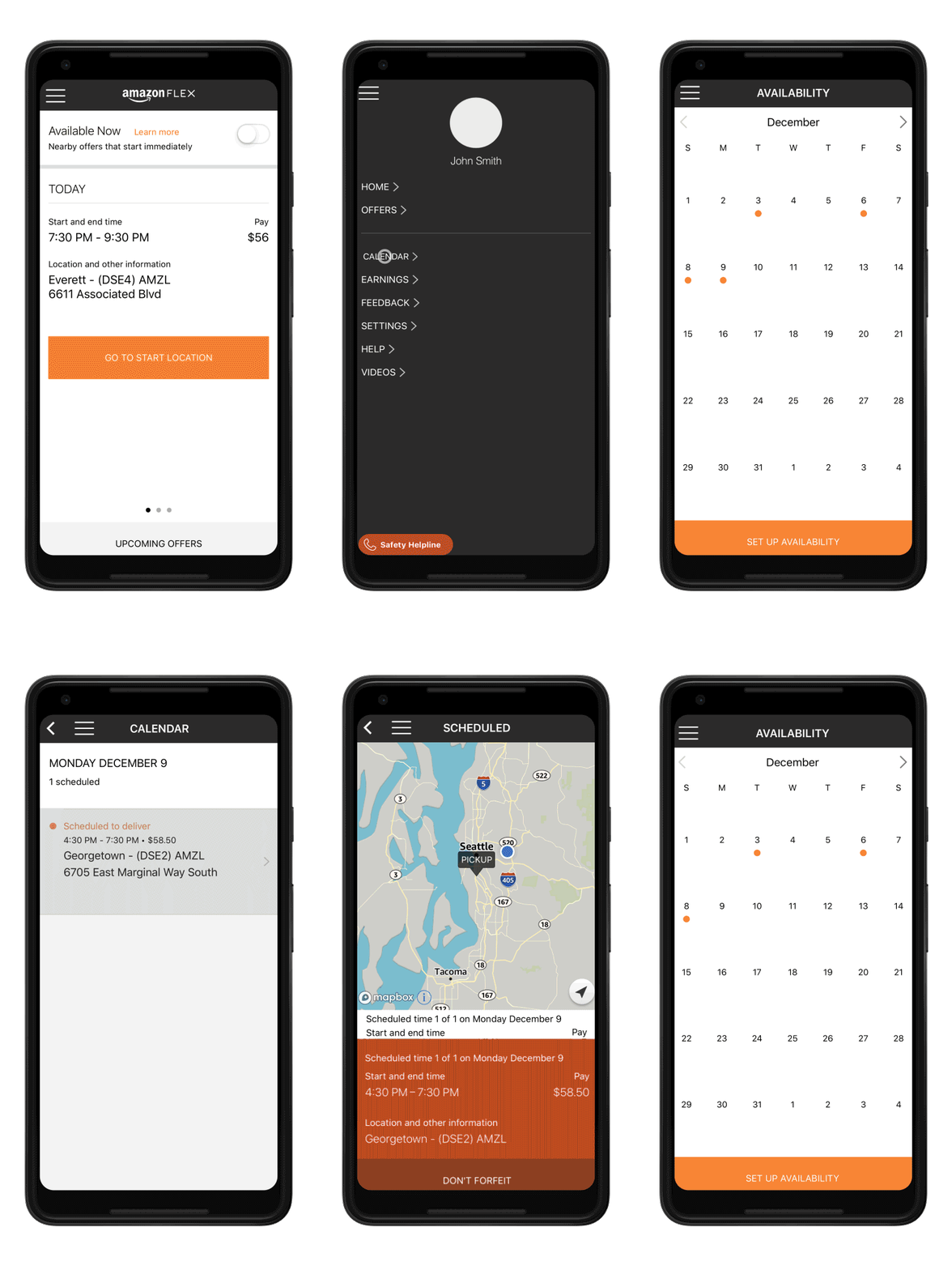
To cancel a scheduled delivery block:
- In the Amazon Flex app, tap the Menu icon and then tap 'Calendar'.
- Tap a day to view additional details, and then tap the delivery block you want to forfeit.
- Tap 'Forfeit This Time' and then swipe to confirm.
Cancel at least 45 minutes before the block’s start time or within 5 minutes if you accept a block that begins in less than 45 minutes. This helps us make sure another driver can pick up your scheduled delivery block and that customers can still receive their packages when we promised.
Your standing and eligibility to deliver may be impacted if you have multiple late cancellations.
What does it mean when my calendar shows orange dots?
Orange dots on the calendar indicate that you have scheduled a delivery block on that day. If you can't make a delivery block or are going to be late, you should forfeit it at least 45 minutes ahead of the block start time.
How many deliveries do I need to make to stay eligible to deliver with Amazon Flex?
You do not need to make a minimum number of deliveries to remain eligible to deliver with Amazon Flex.
Can I rely on Amazon Flex as a source of full-time income?
Amazon Flex provides a flexible opportunity for delivery partners looking to turn free time into supplemental or part-time income. The available delivery blocks may fluctuate week to week and are not guaranteed. Some locations may experience high volumes throughout the year, while others may be more seasonal. The winter holiday season is typically our busiest time of year, which means expanded delivery opportunities that can help you make quicker progress toward your goals.
What is a delivery station/delivery site?
A delivery station or site is a location where you may pick up packages for your block, such as an Amazon Fulfillment Center or a Whole Foods Market.
How do I pick up the orders I need to deliver?
Amazon.com deliveries
- We recommend using the Amazon Flex app to navigate to the Amazon.com delivery station. Follow signs to the delivery partner waiting area.
- Once you’ve arrived, put your vehicle in park and turn on your hazard lights.
- Tap “I’ve arrived” in the Amazon Flex app and have your driver’s license ready. A station associate will ask to scan your driver’s license, and you will be directed to the loading area.
- Once you are provided a cart, find it, and scan the QR code on the route sheet located on the cart to begin loading. Scan the code and each package to ensure you have the correct number of packages for your block.
Sub-Same Day deliveries
- We recommend using the Amazon Flex app to navigate to the Sub-Same Day delivery station.
- When you arrive at your delivery station, park your vehicle, and tap “I’ve arrived” in the Amazon Flex app. Once you’ve scanned your driver’s license, the app will tell you when your route is ready.
- When you receive the notification that your route is ready, look for the cart location code on the app screen. The cart location code will match location stickers on the floor at the station.
- After you’ve located your cart, scan any package to load all packages into your itinerary. For Sub-Same Day deliveries, once you scan your first package, the app will confirm if it’s your cart and all of your packages will be loaded into your itinerary.
- You can review the itinerary and assigned packages to confirm you have all packages.
Amazon Fresh and Whole Foods Market deliveries
- When you arrive at the pick-up location or store, park your vehicle and tap “I’ve arrived” in the Amazon Flex app.
- Once you’ve scanned your license at the kiosk, the app will show you where to find your route cart. Use the signage on the cart to match the number listed in the app.
- Once you’ve found your cart, push your cart to your vehicle, and scan all of your packages before loading them into your vehicle.
- Count your bags as you scan and be sure to double check your cart and the surrounding areas for any missing bags.
What should I do once I finish delivering the packages in my block?
If you’ve delivered all the packages in your block, you do not need to do anything else.If you are unable to deliver a package, select an accurate reason in the Amazon Flex app and follow the app’s instructions.
What do I do with packages I can’t deliver?
If you have any undelivered packages to return at the end of your block, please follow these return guidelines:
• Select an accurate undeliverable reason code in the Amazon Flex app while at the delivery location.
• Return all undelivered packages to the location listed in the app at the end of your block, or by 10 AM the next day.*
• Use the app to scan each package before placing them in the designated returns area or grocery returns rack.
• If the station is closed, place scanned packages in the return bins located at the station.
Here are some tips for returning undeliverable packages:
Amazon.com delivery stations: Most Amazon delivery stations are open until 10:30 PM If you are returning packages after 6 PM, you may need to ring a doorbell for assistance. Look for signs to guide you to the designated returns area or ask an Amazon associate for help. If the return site is closed, place scanned packages in the return bins located at the station.
Amazon Fresh and Whole Foods sites: Most Amazon Fresh and Whole Foods sites are open until 10 PM. Look for signs to guide you to the designated returns area. If you can’t find the grocery returns rack, ask an Amazon associate for help. If the return site is closed, follow any posted instructions. You can also contact Driver Support in the app.
Stores: Third-party stores have different operating hours. If your block ends before the store closes, please scan packages into the app and then return undelivered packages to the designated returns area at the pick-up location at the end of your block, or by 10 AM the next day.
Failing to scan undelivered packages in the app or failing to return packages by 10 AM the next day may impact your standing and eligibility to deliver with Amazon Flex. You can view your standing anytime in the Amazon Flex app under Your Dashboard. If you do not scan each return using the app, it can take multiple days for the return to reflect in your standing correctly.
* NPX2, NSE1, NIN2, NAU2, NMI2, and NNY1 require all undelivered packages to be returned to the station by the end of your block or by 10 PM the same day.
What qualifies as an undelivered package?
Undelivered packages are packages you tried to deliver, but were unable to. Please use the Amazon Flex app to scan and then return any undelivered packages to the location listed in the app at the end of your block or by 10 AM the next day.*
*NPX2, NSE1, NIN2, NAU2, NMI2, and NNY1 require all undelivered packages to be returned to the station by the end of your block or by 10 PM the same day.
Can a passenger be in my vehicle with me when I'm delivering?
While you have the option to bring passengers (including persons or pets), pickups and deliveries may take you away from your vehicle for long periods of time. This policy excludes service animals. Service animals are allowed at all times. If you decide to bring passengers, Amazon expects that you will comply with the following:
- Passengers will need to remain in your vehicle at all times at Amazon stations, unless escorted by a station employee for use of basic welfare facilities. At grocery merchant locations, passengers are not allowed in restricted Amazon Flex areas.
- Your vehicle must have enough space to safely accommodate all packages assigned to your route and any passengers.
- Passengers may not perform or assist with your delivery services, including interacting with customers.
- Passengers may not drive the vehicle while you’re delivering with Amazon Flex.
Non-compliance with this policy may affect your eligibility to participate in the Amazon Flex program.
Is there anything I need to bring or special clothes I need to wear?
As an independent contractor, you are free to decide how to best to prepare for your block.
What to wear: Everyone at U.S. Amazon delivery stations must wear safety vests and closed-heel-and-toe shoes. Safety vests are free, and you can get them at Amazon delivery stations. This policy is applicable when onsite at Amazon delivery stations. To enhance your safety, we strongly recommend wearing a safety vest and closed-heel-and-toe shoes during deliveries as well.
To help you make successful deliveries, other delivery partners suggest keeping the following items with you:
- Phone charger, or a portable power bank, so you don't have to continually plug and unplug your phone. Start with your phone fully charged.
- Flashlight in case you are delivering in the dark.
- Water and snacks to stay hydrated and energized.
- Rain poncho if there's a chance it might rain, to keep you dry.
- Gloves to keep your hands warm if it's cold, or to protect your hands.
- Cart or dolly to carry heavy packages.
Consider taking the following measures to help ensure your vehicle is ready to go.
- Start with a full tank of gas.
- Check vehicle fluid levels and tire pressure.
- Empty your vehicle of trash or other unneeded items, so you can fit package
-
I scheduled a block. Where do I go to start delivering?
When your block time is approaching, drive to the designated location in the Amazon Flex app to pick up your packages. The app will help you navigate to the destination. You are expected to arrive and check in by your block’s start time.
You can swipe up on the pickup location address while in navigation mode for details about access and parking. You can also find helpful check-in information for each type of block in the Starting a Block section of the Learning Portal in the app.
What should I do if I need Support while I’m delivering?
Our Support team is there for you if you ever need help when you’re delivering. Tap the question mark icon (?) in the top-right corner of the Amazon Flex app and select Driver Support.
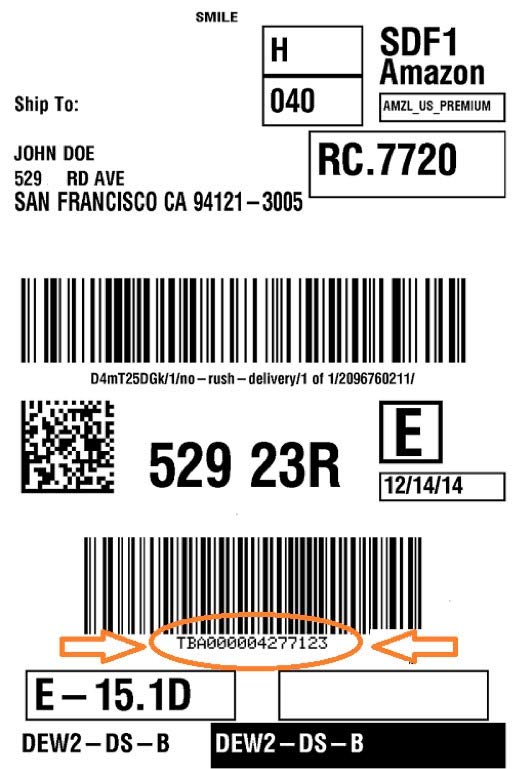
What is a TBA number?
A TBA number is the 12-digit tracking number, preceded by "TBA," that is used for Amazon.com orders. It can be found underneath the bottom barcode on all package labels.
What will I deliver?
You'll deliver Amazon packages of different sizes and weights. More than 100 million items are available to shop on Amazon, including electronics, household essentials, groceries, alcohol, and much more.
Where can I find more information about Amazon Flex’s workplace harassment policy?
Where can I find information about delivering in Seattle?
Where can I find more information about the California Privacy Rights Act?
Under the California Privacy Rights Act (CPRA) that went into effect on January 1, 2023, delivery partners in California may have the right to request access to, or delete, your personal information. If you wish to request access to/ delete your personal information, please contact transportation-privacy@amazon.com.
Where can I find more information about performing services in Colorado?
Where can I find more information on delivering in New York City?
How does Amazon help Delivery Partners conduct their delivery operations safely?
Our deep commitment to safety guides our approach to everything at Amazon Flex. For more information, visit Amazon Flex’s Safety page to learn about some of the ways we prioritize safety so you can earn and deliver with confidence.
How much will I earn delivering with Amazon Flex?
Most delivery partners earn $18-$25 per hour delivering with Amazon Flex. Actual earnings will depend on your location, any tips you receive, how long it takes you to complete your deliveries, and other factors.
Why are some blocks different rates and what impacts the offer rate?
Earnings are based on a variety of factors. Amazon’s minimum contribution varies by city/region, which means the location you deliver in impacts your hourly earnings. During high customer demand, Amazon’s contribution may increase, which will translate into higher earnings.
For deliveries that give customers the option to tip, you always receive 100% of the tips. For every dollar a customer tips, your earnings will increase by that same amount, on top of Amazon’s contribution.
There are other factors, but these are the most significant ones.
How do earnings work?
When you see an offer, you will see the pick-up location, duration, and potential earnings. For programs with no tips, the amount you see in an offer is your guaranteed earnings. Regardless of whether a block ends early or late, you will earn what you see in the offer. As an example, if you see $72 for a 4-hour block, Amazon’s contribution is $72, and that will be the amount you will earn. Amazon will always contribute at least $15-$19 per scheduled hour, depending on your location and demand.
For deliveries that give customers the option to tip, you will see an earnings range. The range shows potential earnings based on tips received for similar blocks recently completed in your region. Most of these blocks earned tips within the range shown in your offer, and at least a quarter of delivery partners earned enough tips to reach the top of the range or exceed it. In the event that you do not have any deliveries during your block or do not receive tips from customers, your guaranteed earnings are the minimum that you were shown in the offer. As an example, if you see $36-50 for a 2-hour block, Amazon’s contribution is $36. If you received no tips, your total earnings would be $36. If you received $5 in tips, your total earnings would be $41. If you received $20 in tips, your total earnings would be $56.
In select U.S. cities, offers will not include a range, and instead you will see “$XX + tips”, with XX showing your guaranteed earnings. As an example, if you see $36 + tips, Amazon’s contribution is $36. If you received no tips, your total earnings would be $36. If you received $5 in tips, your total earnings would be $41.
For deliveries that give customers the option to tip, you always receive 100% of the tips.
How do you estimate customer tips?
Most delivery blocks that allow tips display an earnings range based on the amount of tips that delivery partners received for similar blocks recently completed in your region. At least a quarter of delivery partners earned enough tips to reach the top of the offer range or exceed it.
In select U.S. cities, offers will not include a range, and instead you will see “$XX + tips”, with XX showing your guaranteed earnings. See “How do earnings work?” FAQ for more information.
When will I get paid?
Pick your Payment Day(s):
It’s your choice which weekday(s) you want to get paid. You can decide to get paid every day to get your money faster, or pick just one day so you can streamline your finances. You can choose which days of the week are best for you, and you can also change your days at any time.
For blocks completed from Sunday to Thursday, earnings are available on your next payment day. For blocks completed on Friday or Saturday, earnings are available Monday, or your next chosen payment day. For blocks that are eligible for tips, customers have 24 hours to update the tips, so you’ll receive payment 2-3 days after your completed blocks, or on the next scheduled payment day after this. Earnings scheduled to be paid on a bank holiday may be delayed to the next business day following the bank closure.
Amazon Flex Instant Pay
Amazon Flex Instant Pay enables Amazon Flex Debit Cardholders to get paid shortly after completing a delivery block, at no charge. Tip-eligible blocks are paid 27 hours after block completion. You can apply for the Amazon Flex Debit Card at any time in the Amazon Flex app by going to the main menu > Settings > Personal Information > Payment > Payment Account > Start Application.
Amazon Flex Cashout
Amazon Flex Cashout provides you convenient ways to access your earnings. Depending on your payment method, Amazon Flex Cashout offers:
- Free cashout to your Amazon Flex Debit Card - access your earnings for free shortly after cashing out to your Amazon Flex Debit Card.
- Free cashout to your bank account - access your earnings for free the same or next business day from your existing bank account, or get your earnings shortly after cashing out for a 50-cent fee (subject to your bank participation in Real Time Payment Network).
- Cash out to any debit card – access your earnings shortly after cashing out for a 50-cent fee.You can use Amazon Flex Cashout at any time by going to > Amazon Flex app > Earnings > Cashout > Select your payment speed.
Please note, Amazon Flex transfers funds immediately, and the money should be available in your account by the timelines shown in the app. However, depending on your bank, it may take a few days for the funds to fully appear. If you don't see the earnings in your account after a few days, please contact driver support.
How do I choose my payment day(s)?
To make payment changes, open the Amazon Flex app and choose Settings > Personal Information > Payment. From there you can select your preferred payment days and choose how you want to receive payments. The new day or days you have chosen for payment will be effective after you receive your last payment on your original schedule. For example, if you were previously paid on Tuesday and Thursday, any updates you make to your payment days will take effect after your last Thursday payment. If you don’t make any changes, your default payment schedule will stay the same, and you can update it at any time in the future.
Will I be reimbursed for mileage, parking, or tolls?
As an independent contractor, you are responsible for your own expenses.
Where can I get information about delivering in California?
Visit the Delivering in California page for more information.
What is a standing?
The Standings feature in the Amazon Flex app gives you information about your recent delivery history and how you can continuously improve the customer experience while delivering with Amazon Flex.
There are four Standings: Fantastic, Great, Fair, and At Risk. The majority of delivery partners have a Great or Fantastic standing, which means they are providing excellent service to our customers.
How is my standing determined?
Your standing is based on your recent delivery history and is made up of four areas related to: Arrival and Pickup, Delivery, Returns, and Terms of Service.
What happens to my standing if something occurs that is outside of my control?
We know that sometimes things happen that are outside of your control. In many circumstances, we automatically take many of these issues into account, such as traffic, time of day, station delays, delivery location, and severe weather. We also understand other things can occur that may need to be considered like not being able to deliver due to a closed business. If you run into any problems or have questions, you can contact driver support.
How will I know if something has occurred that will affect my standing?
You can use the Amazon Flex app to review your standing at any time. When we learn about a delivery issue that is within your control, we let you know by sending you an email and/or an update in the app. When repeat or major issues occur, such as repeatedly not showing up for a scheduled block or not following our Terms of Service, our team manually reviews each case to determine if your eligibility to deliver with Amazon Flex should continue. In these circumstances, delivery partners are notified by email when a decision is reached by the review team.
What is Amazon Flex Rewards?
Amazon Flex Rewards is a program exclusively for Amazon Flex delivery partners to thank you for all the work you do. With Amazon Flex Rewards, you can earn cash back with the Amazon Flex Debit Card, enjoy Preferred Scheduling, and access hundreds of discounts as well as tools to navigate things like insurance and taxes.
Getting started with Amazon Flex Rewards is easy—there’s no signup required. You simply earn points by completing blocks and making deliveries. The more points you earn, the higher rewards levels you unlock to access more rewards.
Learn more about how to unlock rewards, and the number of points required to unlock each rewards level by going to the Amazon Flex app > Menu > Your Dashboard > Rewards Details.
How do I earn points?
Amazon Flex Rewards Overview
With Amazon Flex Rewards, you earn points by completing blocks and making deliveries. When you schedule an offer in the Amazon Flex app (reserved offer, instant offer, etc.) you’re scheduling a block—a specified amount of time you will make deliveries with Amazon Flex. You will earn a minimum of 10 points for each block you complete. You will also earn a minimum of 1 point for each delivery you make during that block. For Amazon.com blocks, a delivery is each package you deliver. For Whole Foods Market and Amazon Fresh blocks, a delivery is each customer order you deliver, no matter how many items or packages are in the order.
Your standing will determine how many points you earn for each block and delivery. You will earn points with a standing of Fair, Great, or Fantastic. If your standing is At Risk, you will not earn points or enjoy rewards until you've improved your standing to Fair or higher.
How Points Are Calculated
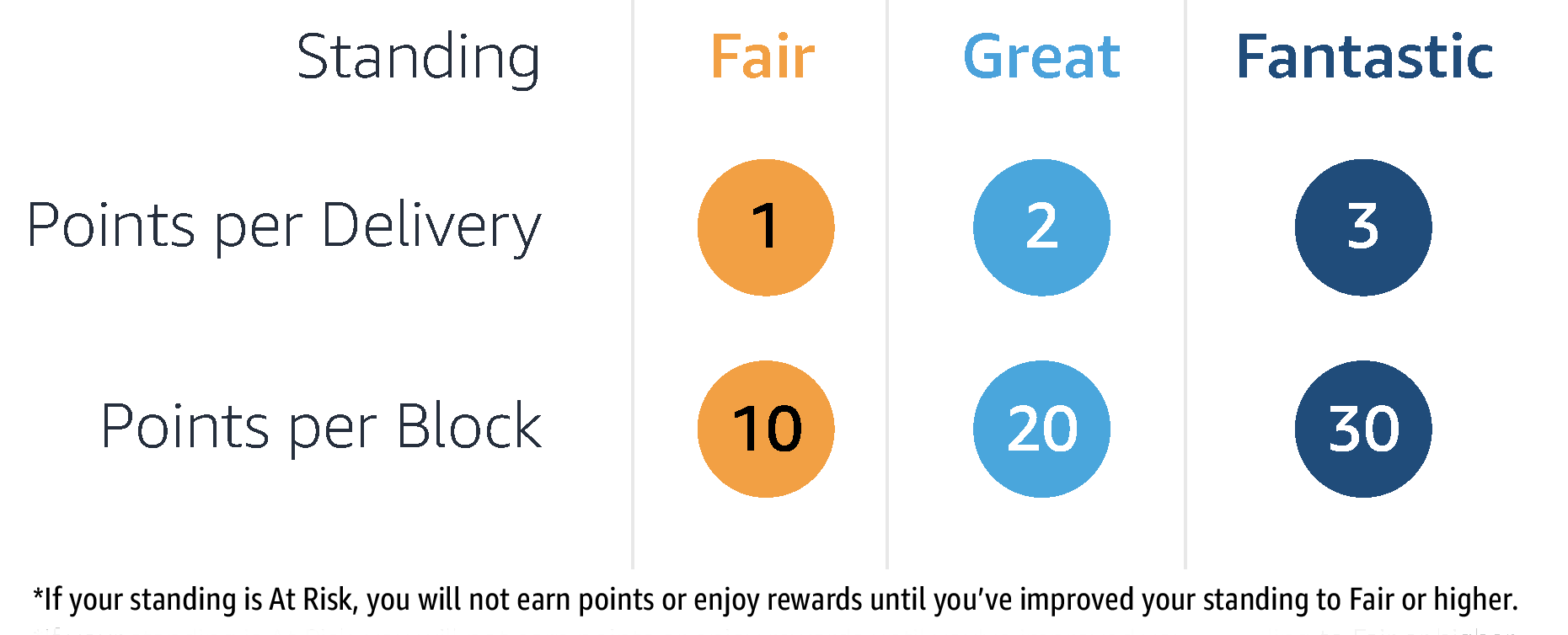
For example, Jasmine is an Amazon Flex delivery partner who schedules one Amazon.com block and delivers 20 packages. If her standing is Fair, she will earn 10 points for that block and 20 points for the packages (20 deliveries x 1 point), totaling 30 points. If Jasmine’s standing is Great, she will earn 20 points for the block and 40 points for the packages (20 deliveries x 2 points), totaling 60 points. If Jasmine’s standing is Fantastic, she will earn 30 points for the block and 60 points for the packages (20 deliveries x 3 points), totaling 90 points.
For more information on how to earn points, please see the Amazon Flex Rewards Program Terms and Conditions. Learn more about standings by going to the Amazon Flex app > Menu > Your Dashboard > Standing Details.
What kinds of rewards can I unlock?
With Amazon Flex Rewards, you can earn a variety of rewards including cash back2 with the Amazon Flex Debit Card,1 Preferred Scheduling, hundreds of discounts, and more. Rewards level 1 unlocks exclusive discounts on a wide range of categories like roadside assistance, tires, car maintenance, shopping, entertainment, and many more. These discounts will be available for you on the Stride app where you can also take advantage of tools to navigate things like enroll in insurance plans and file taxes.3
Starting at rewards level 2, you’ll enjoy additional rewards like increasing levels of cash back on all fuel and eligible EV charging purchases,4 2% cash back on Amazon.com and Whole Foods Market purchases, and 1% cash back on any other purchase with the Amazon Flex Debit Card. You will also enjoy access to Preferred Scheduling. As you level up, you’ll see more offers that are customized to your preferences, and you will have longer times to schedule these offers while they are reserved just for you.
Learn more about the number of points required to unlock each rewards level, as well as the rewards in each rewards level, by going to the Amazon Flex app > Menu > Your Dashboard > Rewards Details.
How many points do I need to unlock rewards levels?
You unlock rewards levels by earning points. You earn points by making deliveries and completing blocks. To unlock rewards level 1, you will need to earn 1 point. To unlock rewards level 2, you will need to earn 650 points. To unlock rewards level 3, you will need to earn 3,000 points. To unlock rewards level 4, you will need to earn 6,500 points. You will have a 3-month earning period to earn points. Your points will reset at the end of every 3-month period, and you will need to earn points in the next earning period to keep your rewards level.
Learn more about the rewards available at each rewards level by going to the Amazon Flex app > Menu > Your Dashboard > Rewards Details > Level Details.
What is the earning period?
The Amazon Flex Rewards program has cyclical 3-month earning periods. The points you earn during an earning period determine the rewards levels you unlock and the rewards you enjoy. When you earn enough points to unlock a new rewards level, you gain access to the rewards offered in that level for the remainder of the current earning period as well as throughout the following 3-month earning period. At the end of each earning period, your point balance resets to zero and a new earning period begins. So, keep delivering to keep the rewards you unlocked.
The earning periods are: January-March, April-June, July-September, and October-December.
You can track your progress towards higher rewards levels by going to the Amazon Flex app > Menu > Your Dashboard > Rewards Details.
How soon after I complete a delivery will my points total update?
Your points will update within 72 hours of completing a block. You can track your points and see when they were last updated by going to the Menu > Your Dashboard > Rewards Details > Points History. If your points have not updated and it has been more than 96 hours since you completed a block, please use chat in the Amazon Flex app to get the help you need. In the app, tap Main Menu >Help > Contact Us > Chat.
How do I maintain access to my Rewards?
To maintain access to your rewards, maintain a standing of Fantastic, Great or Fair and continue to make deliveries. If your standing decreases to At Risk, your access to rewards will be paused until you improve your standing. However, you won't lose rewards you've already enrolled in or purchased, or cash back you’ve earned. For more information about access to rewards, please refer to the Amazon Flex Rewards Program Terms and Conditions.
Learn more about your standing by going to the Amazon Flex app > Menu > Your Dashboard > Standing Details.
Are there terms and conditions to Amazon Flex Rewards?
Yes. You can find the Amazon Flex Rewards Program Terms and Conditions.
What is Preferred Scheduling?
Preferred Scheduling is designed to give you even more control over your schedule. To enjoy Preferred Scheduling, you must unlock at least Level 2 Rewards. You can then set your preferred station, day of week and time of day in the Settings menu in the Amazon Flex app. After you’ve set your preferences, you will start to see reserved offers labeled with your rewards level on the Offers page when we have available offers that match one or more of your set preferences. Setting your Preferred Scheduling preferences won’t impact any filters you have previously set or the total number of offers you see. As you level up, you are more likely to see a higher number of Rewards reserved offers that match one or more of your preferences. Plus, you’ll have more time to schedule these Rewards reserved offers!
- Rewards level 2: 15 minutes
- Rewards level 3: 20 minutes
- Rewards level 4: 30 minutes
How do I set my preferences for Preferred Scheduling?
To set your Preferred Scheduling preferences, go to Amazon Flex app > Menu > Your Dashboard > Rewards details > Set offer preferences. You can select up to 3 preferred delivery stations, and up to 3 day and time combinations that work best for you. You will be able to set these preferences once you unlock rewards level 2 and they can be updated at any time. After you set your preferences, Rewards reserved offers will appear in the Offers page based on the availability of offers that meet one or more of your preferences. The Preferred Scheduling preferences you set will only apply to these additional Rewards reserved offers. They will not limit the offers you see on the Offers page.
What is the Amazon Flex Debit Card?
The Amazon Flex Debit Card1 is offered exclusively to delivery partners, in partnership with Green Dot Bank, Member FDIC. It offers cash back,2 no monthly account fees,5 and access to over 19,000 ATMs.5 With the Amazon Flex Debit Card, you can earn up to 6% cash back on all fuel and eligible EV charging purchases,4 2% cash back on Amazon.com purchases, and 1% on any other purchases. You will also have access to an exclusive Amazon Flex Debit Card banking app to manage your account. It’s easy to get money deposited onto the Amazon Flex Debit Card – just set it as your preferred payment account in the Flex app. Go to the Amazon Flex app > Menu> Settings > Personal Information >Payment, select debit card and enter your Amazon Flex Debit Card number, expiry date, and CVV and insert your Amazon Flex Debit Card account and routing number. To obtain your Amazon Flex Debit Card account and routing numbers, open your Amazon Flex Card app and tap on Direct Deposit.
For more information about the Amazon Flex Debit Card, click to see the Deposit Account Agreement, provided by Green Dot Bank.
How do I apply for the Amazon Flex Debit Card?
You can apply for the Amazon Flex Debit Card1 on the Rewards Details page in Your Dashboard of the Amazon Flex app. Go to the Amazon Flex app > Menu> Your Dashboard > Rewards Details. Tap the Amazon Flex Debit Card application button at the top of the screen to start the application process.
How does cash back work?
You can earn up to 6% cash back on fuel and eligible EV charging purchases,4 2% cash back on Amazon.com and Whole Foods Market purchases, and 1% cash back on all other purchases, up to $500 in total cash back per month. The percentage of cash back you can earn depends on your rewards level. The higher your rewards level, the higher percentage of cash back you can earn. Any cash back you earn will usually appear in your account after the qualifying purchase clears, but can take up to 30 days.
For more details about earning cash back, see the Deposit Account Agreement provided by Green Dot Bank.
For questions about cash back or the Amazon Flex Debit Card, contact Green Dot Bank to speak to one of their Banking Specialists. Banking Specialists can be reached by calling the number on the back of your Amazon Flex Debit Card or messaging them through the Amazon Flex Card app.
Which public electric vehicle (EV) charging merchants are eligible for cash back?
You can earn cash back for EV charging purchases at stations operated by these participating EV charging networks: Electrify America, EVgo, Blink Charging, Shell Recharge Solutions, EV Connect, PowerFlex, and AmpUp. List subject to change.
Do I need the debit card in order to earn rewards?
No, you don't need the Amazon Flex Debit Card to participate in most aspects of the Amazon Flex Rewards program. You can earn points, access Preferred Scheduling, enjoy fuel rewards at participating stations, and access hundreds of discounts through Stride without the debit card.
However, certain financial benefits do require the Amazon Flex Debit Card:
- Cash back rewards on purchases
- Instant pay access
- Free cash-out options
You can continue earning points and accessing other program benefits regardless of whether you choose to get the debit card.
Are there any fees to use the Amazon Flex Debit Card?
Your Amazon Flex Debit Card account is a deposit account with no monthly fee.5 You will also have 3 free ATM withdrawals per month at in-network ATMs. Additional withdrawals from in-network ATMs and all withdrawals from out-of-network ATMs will incur $3.00 fee per withdrawal, plus any additional fee that the ATM owner or bank may charge.
For more information about fees, see the Deposit Account Agreement provided by Green Dot Bank at https://secure.amazonflex.greendot.com/account/legals/daa.html.
What if I have questions about the Amazon Flex Debit Card or the Amazon Flex Card app?
For questions about Amazon Flex Debit Card or the Amazon Flex Card app, contact Green Dot Bank to speak to one of their Banking Specialists. Banking Specialists can be reached by calling the number on the back of your Amazon Flex Debit Card or messaging them through the Amazon Flex Card app.
For more information about the Amazon Flex Debit Card, see the Deposit Account Agreement provided by Green Dot Bank at https://secure.amazonflex.greendot.com/account/legals/daa.html.
What is Amazon Flex Instant Pay?
Amazon Flex Instant Pay enables Amazon Flex Debit Cardholders to get paid shortly after completing a delivery block, at no charge. Tip-eligible blocks are paid 27 hours after block completion.
What is Stride and how do I access my rewards?
We have partnered with Stride3 to provide delivery partners with access to hundreds of discounts and tools to help you navigate things like insurance and taxes.
To access the rewards available through Stride, you will need to set up a Stride account and download the Stride app. Go to Amazon Flex app > Menu > Your Dashboard > Rewards Details > Level Details and click ‘Access Stride app’. This will open the Stride website. Follow the directions to create an account using the email address you use for your Amazon Flex account. Then, download the Stride app and log in to see your rewards.
What if I have questions about the rewards in the Stride app?
You can learn more about the Stride3 app and your available rewards by opening the Stride app and going to My Profile > Help. If you have additional questions, you can contact Stride support at: amazonflex-support@stridehealth.com or by calling Stride support at 415.223.2425.
1. The Amazon Flex Visa® Business Debit Card is issued by Green Dot Bank, Member FDIC, pursuant to a license from Visa U.S.A., Inc. Visa is a registered trademark of Visa International Service Association. Green Dot Bank also operates under the following registered trade names: GO2bank, GoBank and Bonneville Bank. All of these registered trade names are used by, and refer to, a single FDIC-insured bank, Green Dot Bank. Deposits under any of these trade names are deposits with Green Dot Bank and are aggregated for deposit insurance coverage up to the allowable limits.
Neither Green Dot Bank, Green Dot Corporation, nor Visa U.S.A. or any of their respective affiliates are responsible for products or services provided by third parties. Third party terms and conditions apply. All third-party names and logos are trademarks of their respective owners. These owners are not affiliated with Green Dot Corporation and have not sponsored or endorsed Green Dot products or services. ©2026 Green Dot Corporation. Green Dot is a registered trademark of Green Dot Corporation. All rights reserved. Green Dot Corporation NMLS #914924; Green Dot Bank NMLS #908739.
Bank account opening is subject to identity verification by Green Dot.
2. Maximum cash back limit of $500 per month applies across all categories. Additional terms, conditions limitations and exclusions apply. Rewards are subject to change at any time at our sole discretion. See terms and conditions for complete details.
3. To access discounts as well as tax and insurance tools, you must sign up and create an account on the Stride app. Discounts and services subject to availability and qualifying terms of applicable retailers and merchants.
4. Earn cash back for electric vehicle (EV) charging purchases at stations operated by these participating EV charging networks: Electrify America, EVgo, Blink Charging, Shell Recharge Solutions, EV Connect, PowerFlex, and AmpUp. List subject to change.
5. Other fees apply to the Amazon Flex debit Card. Three free In-Network ATM withdrawals per calendar month, $3.00 per transaction thereafter, plus any additional fee that the ATM owner or bank may charge. Please see Deposit Account Agreement for details.